A patient tutor for your child who teaches, not tells — and you stay in control.
OSQR Tutor is a patient AI tutor for your kid — whether they're in school, working through homework, or learning at home. Nine subjects, step by step, at their own pace — with strict content settings and you in charge.
Their first Starting Point is free — no card required.
The Arizona ESA Homeschool Planner — free
A 15-minute, fill-in-with-a-pen planner: spend your ESA funds on purpose, map your year on one page, and run a simple weekly on-track check. No signup, no login.
Your child signs in to a patient, always-available companion that explains concepts and works through problems step by step at their grade level. It teaches instead of just answering, and it works alongside whatever they're learning — in school or at home.
Nine subjects, one companion
You set it up. You stay in control.
You create your child's account and manage it from a parent portal.
Tutor mode
Set a coaching level from 1 to 10. Turn it up and OSQR holds back the answer and guides your child to it with hints — teaching, not just telling.
Daily time limits
Choose how long your child can use OSQR each day, or leave it unlimited.
Tool access
Decide what your child can use — web access, integrations, image generation. Each one is off until you turn it on.
You choose what you see
For younger children you see their conversations. Teens start on alerts-only, so they use it honestly — you can change that either way. You own the account you created.
Safe by design
Strict content, every child
Every child account runs on our strictest content setting: every reply is checked before your child sees it, and mature language is filtered out. You can loosen it for an older teen.
Distress alerts
On by default. An automatic check watches for signs a child may be struggling and emails you. If it looks urgent, it also texts you, once you've verified your phone. You can switch alerts off.
Your child's privacy
You create and own your child’s account. We collect as little as we can, and you can delete your child’s account and data at any time from your parent portal.
A record of who has looked
We can read your child’s conversations — you can too, and the safety checks depend on it. But we can’t read them through our own tools without leaving a record you can see: who, when, and why, in your parent portal. The entries are linked to each other, so removing one or changing its time breaks the chain and shows.
Working with a tutor? They work inside OSQR too.
When your child has a human tutor on OSQR, everything between them runs through you — and you decide what that tutor can do.
Tutors message you, never your child
Your child’s tutor writes to you, not to them. Every message shows in your parent portal’s access record, and you can switch a tutor’s messaging off.
Book sessions in a tap
The tutor offers times; you pick one or decline. A calendar invite comes by email and works with Google, Apple or Outlook calendars.
Video sessions inside OSQR, where you can watch
Off until you allow it for that tutor. Sessions happen only at a time you booked, and you can join or watch. Nothing is recorded on video; you can read the written transcript, and a summary of the session comes to you by email afterwards.
A shared whiteboard
Tutor and child work problems out on one board during the session. Drawing and typing only — no pictures, no links — and what your child writes gets the same safety check as what they say.
OSQR helps the tutor, live
During the session OSQR sits beside the tutor in a side panel, noticing where your child is stuck and suggesting what to try next. Your child never sees it. If you join, you see the same panel.
Simple pricing, per child
Sign up free, add your child in the Parent Portal, and they start immediately. Each child gets their own plan.
Try it free
Your child's first Starting Point — a warm, no-grades placement in Math — is free. OSQR finds exactly where they are and builds their first skill map. No card required.
Start freeStarter
Early-user price. The regular price will be $29/mo.
- Placement across all nine subjects
- Practice sessions that teach from their exact level
- Level-ups and a skill tree they watch grow
- Learning receipts — printable proof of real work
- Every parent control on this page
Bigger plans (Pro and Operator) are available per child in the Parent Portal. Paying with Arizona ESA funds? Quarterly billing is built in — see how it works below.
Use your Arizona ESA funds
OSQR Labs LLC is an approved Arizona ESA vendor (Online Learning Program). Here's how families pay with their ESA funds through ClassWallet — you're never out of pocket.
Start your child on OSQR
Create your child’s account and email us that you’re paying with ESA funds. A person on our side sets up the plan, and your child starts before ClassWallet pays. (The Starting Points pack is the exception: ask for it with ESA funds on your child’s page, and it switches on when ClassWallet’s payment lands.)
Get your invoice
We hand you an itemized invoice with your student’s name, plan, and dates — formatted for ClassWallet.
Submit it in ClassWallet
Log into your own ClassWallet account and submit the invoice through DirectPay (“Pay Vendor”).
Arizona ESA pays OSQR directly
The ESA reviews it and pays us by ACH. No reimbursement, nothing out of your pocket. (Your ClassWallet ESA card also works at our checkout, if you’d rather.)
We are an approved Arizona ESA vendor; the Arizona Department of Education has the final say on each purchase.
Tutors built around your curriculum
Point OSQR at the textbook or curriculum you already use, and it becomes a dedicated tutor for it — walking your child through the exact lessons and problems they're working on. We're building the parent-friendly version of this now.
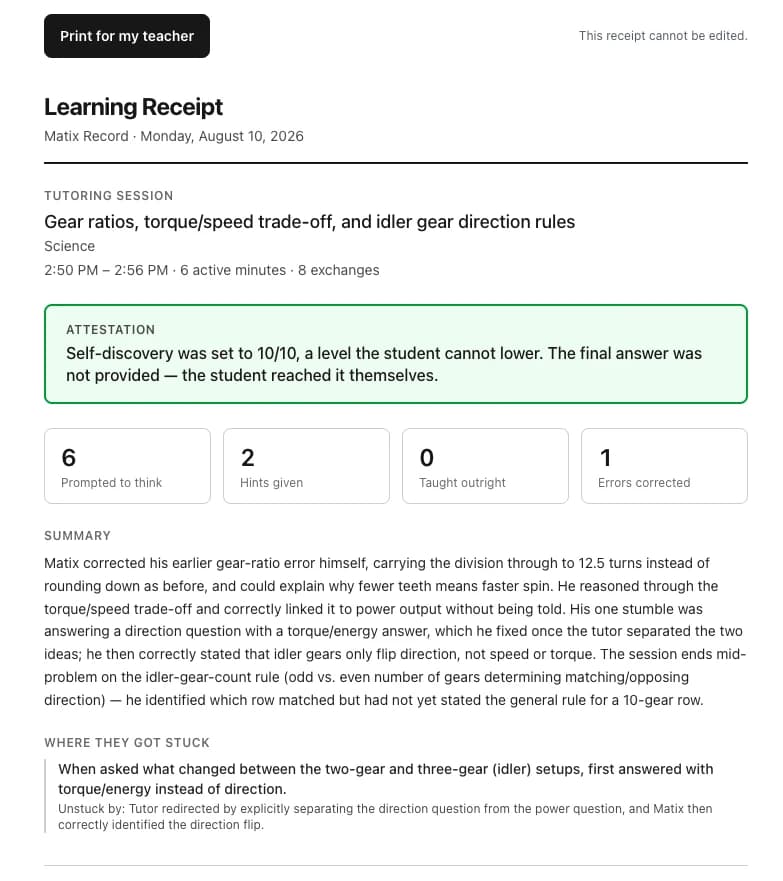
A real session's receipt — the tutor prompted six times, gave zero answers outright, and the student reached the answer themselves.
Straight answers
Will it just give my child the answers?
No, and that is the entire point of it. It asks questions back and works the problem through with them. If your child pushes for the answer, it keeps teaching — and if the answer ever does get provided, that is written down in the receipt you see, plainly, either way.
How do I know what they actually did?
You get a learning receipt: how many minutes they genuinely worked with idle time excluded, how many times they went back and forth, where they got stuck, what got them moving again, and which misunderstandings came up and whether they were resolved.
How does it know what level my child is at?
It starts where you say they are — their actual grade — and finds the real edges from there by working with them, rather than asking you to guess or making them sit a test before they are allowed to learn anything.
Can I use Arizona ESA funds?
Yes. OSQR Labs is an approved Arizona ESA Online Learning Program vendor and is set up in ClassWallet, so ESA funds can pay for it directly.
Is the price per child?
Yes, per child. Each one gets their own account, their own level and their own receipts — siblings do not share a history, because a fourteen-year-old and an eight-year-old do not need the same tutor.
Do I need an OSQR subscription as well?
No. The tutor stands on its own. You do not need a plan of your own for your child to use it.
What if it is not right for us?
Ask within thirty days of buying and you get every dollar back. No forms, no retention call — email and it is done.
Ready when they are.
Sign up free, add your child in the Parent Portal, and their first Starting Point is waiting the moment they log in.
Create your child's accountQuestions? Email the founder directly — he answers.
OSQR Tutor is offered by OSQR Labs LLC, an approved Arizona ESA vendor. The Arizona Department of Education has the final say on ESA allowability.